Author Archive

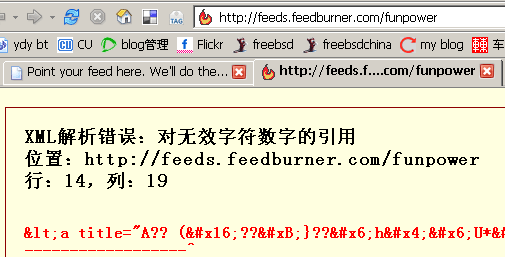
我的feedburner解析错误?

发现我的feedburner解析错误,但访问同帐号下的另外一个正常。奇怪了?难道是我这边的问题。
firefox扩展

这两天一直看到有朋友利用ListZilla将自己的firefox扩展贴出来,今天也花了些时间将自己的firefox扩展了一下,用了以后才发现原来firefox的扩展有这么多。

我的firefox扩展列表:

Enabled Extensions: (20)

Adblock 0.5.2.056
All-in-One Gestures 0.17.4
Bloglines Toolkit 1.6.0
del.icio.us 1.0.2
Fasterfox 1.0.2
FlashGot 0.5.9.99
Gmail Space 0.2
IE Tab 1.0.7
Launchy 4.1.0
ListZilla 0.7
Live HTTP Headers 0.11
Modern Pinball 1.5.1
Noia 2.0 (eXtreme) 2.992
Pearl Crescent Page Saver 0.9.1
Performancing 1.0.1
SearchStatus 1.14
StumbleUpon 2.2
SwitchProxy Tool 1.3.4
Tab Mix Plus 0.2.5.2
Xinha Here! 0.3

导出方法:运行firefox,并打开这个链接,点击Install ListZilla 0.7开始安装。然后关闭firefox,再打开,在菜单栏的<工具>下就会多一个Export to ListZilla to …的选项,有三种导出方式 HTML、Text、vB Code。

安装firefox扩展站点:Mozilla Update | 中国  、 Mozilla UpdateTop 15 Firefox Extensions

禁止某ip使用socks5服务

继上次架设完FreeBSD6.0Release+Squid+Socks5服务器架设笔记后,服务器运行基本正常,但今天发现socks5服务不能使用。以为是socks5进程死掉了,就运行stopsocks -KILL,将socks5停止。然后使用socks5命令重新开启socks5服务。可没过多久,socks5服务又不能用了。马上用netstat  -nat命令查看网络连接情况,发现有一ip 172.16.1.199开启了无数进程发向服务器的1080端口。为了大局,决定暂时先停止此ip的连接,没有过socks5禁止过某一ip,所以一开始没顺利禁止此ip,后来看了如何在Solaris 9系统下实现socks5代理一文后才了解如何禁止。

其实很简单,socks5.conf中开启某段ip是用permit字段,将permit改成deny就可以,方法如下:

将/usr/local/etc/socks5.conf:

auth – – –
permit – – 172.16. – – –
set SOCKS5_NOIDENT
set SOCKS5_V4SUPPORT

改成以下内容即可:

deny  – – 172.16.1.199/255.255.255.255 – – –
auth  – – –
permit  – – 172.16. – – –
set SOCKS5_NOIDENT
set SOCKS5_V4SUPPORT

www.freebsd.org可以正常访问了

刚刚试着访问www.freebsd.org,可以访问。看来误会解除了,HAPPY!

诺基亚7610 这机子如何?现在又在看三星D608了

03年2月买的摩托罗拉e360,最近一直出问题,老自动关机,所以准备过年时重新装备一个。目前选了诺基亚7610,想问问用过的朋友,这机子如何?谢谢。

2006-1-6更新:看了几天的资料,眼都花了。前天一朋友买了另外一朋友的三星d608水货手机,价格2800左右。试了一下机子,不错。三星的不太了解,但都说它的水货货质量不错。再考虑考虑了要。

Google服务清单 [2006-1-3]

原文我不能直接访问,所以直接转帖过来(英文不行,不能翻译,抱歉)。自己算了一下,我使用的有8项服务:GMail (or Google Mail) 、Google AdSenseGoogle AnalyticsGoogle EarthGoogle Image Search  、Google TalkGoogle Language Tools (像我英盲的人挺有用)、Google Web Search 。

[原文]————————————>>

The Ultimate Guide to Google Services

Submitted on November 17th, 2005 by Jay Koby
Filed under Services and Software and Tips, Tricks & Hacks and Audio and Resources and Graphics and Browsers and Video and Productivity and Email and Books and Shopping and Storage
Post to blinklist  |  del.icio.us |  furl |  shadows |  simpy |  spurl |  yahoo

Anyone who has ever used the internet probably knows about Google’s web search, but did you know that Google does a lot more? We’ve discussed many Google services on TipMonkies before, but there are some which some of you may not be aware of. Read the full article to get the giant list of Google services and what each does. We’ll try to keep this list up-to-date as Google begins rolling out more services (because you know they will).

Here’s the big list of Google’s services:

  • Add to Google lets publishers create a custom “Add to Google” button for their RSS feeds. When a user clicks the button, they can choose to either add the feed to Google Reader, or the Google Homepage service.
  • Blogger is Google’s blog-hosting and creation service which seems to be very popular on the web because of the price (free) and ease of use.
  • Froogle is Google’s product search engine that you can use to find the cheapest price for a product.
  • GMail (or Google Mail) is Google’s popular email service, that gives you over 2 gigabytes of storage.
  • Google AdSense is Google’s contextual advertising service, popular among many websites. Google also released Onsite Advertiser Sign-Up on November 21, 2005 which lets advertisers buy ads on a site directly from the Google Ads on that page.
  • Google AdWords is the other side of AdSense. While AdSense lets publishers put ads on their site, someone has to pay for those ads, and AdWords connects companies with publishers so you can make a little bit of money.
  • Google Alerts are e-mail updates to particular searches you do on Google. Pretty useful for monitoring websites or news.
  • Google Analytics crawls your website and keeps track of your visitors through a small piece of Javascript. Great tool for webmasters trying to improve their stats and AdSense revenue.

  • Google Answers lets you hire someone to research a topic or answer a question for you.
  • Google Base looks like its going to be Google’s massive content library, with all sorts of content, uploadable by anyone. Oddly enough, it sounds like EPIC and Google Grid mentioned in this video. Many people are comparing this service to Craigslist.
  • Google Blog Search is very much like the web search service but letting search only through various blogs around the web.
  • Google Book Search allows you to search though books that Google has scanned into their database.
  • Google Catalogs is a search engine for mail-order catalogs.
  • Google Click-to-Call lets users call advertisers directly from Google search results, for free, at Google’s expense.
  • Google Code is Google’s effort to promote and contribute to Open Source software.
  • Google Compute exists as a part of the Google Toolbar and uses your computer’s idle time (when you’re not using it) to compute data from distributed computing projects like Folding@Home.
  • Google Deskbar is essentially an embedded IE window in your Window Taskbar that you can search Google from.
  • Google Desktop is similar to apps like Konfabulator or Dashboard but not as attractive. It offers various widgets and a sidebar which let you do things like searches, aggregate feeds, write notes, check weather, and more.
  • Google Directory which is similiar to Yahoo’s and dmoz’s services, letting you search by category.
  • Google Earth is a desktop application which is basically Google Local on steroids.
  • Google Groups allows you to create a mailing list, read Usenet posts, and generally collaborate with others who share a similar interest.
  • Google Homepage is a webpage which lets you add various widgets like weather, news, horoscopes and more, much like Netvibes.
  • Google Image Search is Google’s slightly-lesser-known service to search for images.
  • Google Labs highlights all the projects Google is working on for future release.
  • Google Local combines data from Google Maps with information on local businesses and venues.
  • Google Maps is a mapping service which also provides driving directions to and from different locations. The service is only available in a few countries (mainly the U.S.) but support for other countries is expected in the future. Google Maps has become quite popular lately thanks to a readily available API which lets people create their own maps.
  • Google Mobile is similiar to Google SMS, but using WAP instead.
  • Google Movie Showtimes lets you type in a zip code or address, and it will find movie theaters and showtimes near that area.
  • Google News is a news portal, aggregated by Google’s computers. Everything is done by machines, so no human interaction.
  • Google Reader is a new product which acts as a web-based RSS reader.
  • Google Ridefinder lets you easily find taxis in some of the major cities around the United States.
  • Google Scholar searches things such as theses, papers, and other research and technical information.
  • Google Search History is technically part of the Google Homepage service, but does have its own page so it warrants a mention. Basically, if you sign in with a Google account, Google will keep track of all your searches done via its web search engine.
  • Google Send to Phone is a little Firefox extension which lets you send text messages to mobile phones via SMS.
  • Google Sitemap helps create particular searches for a web address which can be very useful for webmasters looking to index their own site, or see who is linking to it.
  • Google SMS allows you to access many Google services through your mobile phone through text messaging (message GOOGL to learn more).
  • Google Store isn’t really a service, but rather a place to buy some cool Google merchandise.
  • Google Suggest is just an extension to the normal Google web search engine, but with autocomplete functionality to your searches making it a little easier to find what you need. There is also

    a Firefox extension available.

  • Google Talk is Google’s IM and VoIP program running on the Jabber network. You need a Gmail account to use this.
  • Google Toolbar is the swiss army knife of toolbars, if ever there was one letting your use the various Google web services from your toolbar, as well as offering other interesting information like a site’s PageRank and more.
  • Google Language Tools lets you translate a phrase or entire website, as well as giving you access to web search in different languages, or the ability to search for a particular something in just one language.
  • Google Video and Google Video Upload offer an archive of freely available video clips.
  • Google Web Accelerator supposedly helps load web pages faster, but there have been security and privacy issues raised about this application.
  • Google Web Search is the familiar web search. It also allows you to access certain functions like a calculator, a stock tracker, word definitions, travel information, weather, and more by simply searching for that information (for example, define onomatopoeia or weather 90210). These are not standalone services but a part of web search, which is why I’ve added them here and not into their own section. Additionally, there is the Advanced Search feature for…well…advanced searches which could be more precise than normal searches.
  • Hello is a small IM client which is used in conjunction with Picasa to share pictures with family and friends.
  • Orkut is a networking site similar to Frienster or MySpace, except it is invite only, so if you want to join it, you’ll have to know a guy, who knows a guy.
  • Picasa is a fantastic digital photo organizer application for your desktop.

Now that you know about many of Google’s services, get out there and start Googling!

UPDATE from Martin: added AdSense, Analytics, and SiteMaps to the list.
UPDATE 2 from Martin: added Alerts, Compute, RideFinder, Send to Phone, Suggest, and Hello.
UPDATE 3 from Martin: renamed Google Print to Google Book Search, added Google Movie Showtimes.
UPDATE 4 from Martin: added AdWords and Orkut.
UPDATE 5 from Martin: added Search History, Language Tools, and a mention of Advanced Search in the Web Search item.

新年新气象-06年第一贴

三天没碰计算机,今天一上邮箱,只有八封垃圾邮件。浏览SolidotGoogle2006年的15个预测时才发现原来Google Analytics已经停止新用户的申请了,幸好以前就申请了一个,不过我想今年不久应该马上会开放申请的。

另外,上星期提的www.freebsd.org不能访问的事freebsdchina.org上的delphij已经发了公告,我这边就封了www.freebsd.org封了,其它的都没封,我想应该就是delphij说的可能是某些误会引起的这事,希望能很快解决。

新的一年开始了,继续奋斗。新年新气象,换了张PP,挺 “” 的,呵呵。

访问维基方法

收集了几种:

1、使用代理:一步一步上维基

2、使用百科浏览器

3、使用web型代理服务器(像我一样IE上设置了代理服务器(局域网内并且是非透明代理)上网的朋友特别有用,我就在用)

PS:明天回老家昆山两天,06年见了,朋友:)

2005年我常去的9个站点

看到很多朋友都在总结自己这一年的常用网络服务或是软件,最深的变化是,以前一找开浏览器,第一个开的网站肯定是新浪,然后是一些论坛之类的站点,但今年,基本上的都是web2.0形式的站点,不知道明年会有什么大的变化,记下今年的,明年这个时候再翻看这篇,所以05年的最后第二天也总结一下,基本上了都是我firefox工具栏上的网址:

1、freebsdchina.org freebsd(最近不能正常访问,如不能请通过http://216.136.204.21/来访问)中文社区。freebsd在国内的影响力还不是太大,很多人包括一些在计算机行业的朋友都很少知道freebsd这个操作系统。freebsd在中国的推广还任重道远。

2、del.icio.us ,最初是chedong的del.icio.us使我知道了这个站点,但因为E文太烂,所以一直没有使用。后来因为想使用,就特地找了一篇del.icio.us的中文教程,一边看一边操作,到现在已经能熟练操作了。在这期间,del.icio.us提供了很多新功能,界面也进行了一定的修改,年末又归入了YAHOO!旗下,希望del.icio.us继续他的风格。

3、flickr , 虽然我照片不多,但我可以看到世界各地有趣或漂亮的照片,特别是blog.flickr.com

4、donews blog ,了解最新的IT信息

5、我建的lilina ,利用lilina订阅我每天必读的一些blogger。chedong的lilina比我的打开速度显示要快,那都是因为chedong对lilina的两次优化(12),有空应该再看看他的笔记,也进行一些调整。

6、gmail ,从去年底我就慢慢开始将gmail作为我的主邮箱,相信明年的不久,MicrosoftYAHOO!的新邮箱也要上线了,但我想到时也没什么理由要换邮箱。

7、chedong的lilina , 车东关注的信息。

8、keso blog , 每天必读blog。我很佩服keso能很有规律的天天至少一篇blog+一篇365key网摘。和keso一样,我也喜欢google

9、ydy bt , 伊甸园BT下载区,虽然这里提供的影视不如其它地方提供的影视(特别是最新的影视作品)速度快,但他提供的影片的质量都非常高。

www.freebsd.org不能访问

我从昨天中午开始发现不能访问www.freebsd.org,ping www.freebsd.org不能,ping freebsd.org是通的,但也不能访问,通过直接输入freebsd.org的映射IP(http://216.136.204.21/)是可以访问的。

proxy3# ping www.freebsd.org
PING www.freebsd.org (216.136.204.117): 56 data bytes
^C
— www.freebsd.org ping statistics —
10 packets transmitted, 0 packets received, 100% packet loss

proxy3# ping freebsd.org
PING freebsd.org (216.136.204.21): 56 data bytes
64 bytes from 216.136.204.21: icmp_seq=0 ttl=51 time=238.472 ms
64 bytes from 216.136.204.21: icmp_seq=1 ttl=51 time=238.630 ms
64 bytes from 216.136.204.21: icmp_seq=2 ttl=51 time=235.612 ms
64 bytes from 216.136.204.21: icmp_seq=3 ttl=51 time=223.974 ms
64 bytes from 216.136.204.21: icmp_seq=4 ttl=51 time=225.433 ms
^C
— freebsd.org ping statistics —
5 packets transmitted, 5 packets received, 0% packet loss
round-trip min/avg/max/stddev = 223.974/232.424/238.630/6.411 ms

proxy3# traceroute www.freebsd.org
traceroute to www.freebsd.org (216.136.204.117), 64 hops max, 40 byte packets
 1  218.90.159.25 (218.90.159.25)  137.597 ms  4.092 ms  3.696 ms
 2  61.177.111.37 (61.177.111.37)  0.689 ms  0.633 ms  0.631 ms
 3  * * *
 4  58.215.66.9 (58.215.66.9)  1.725 ms  9.405 ms  1.145 ms
 5  61.177.101.77 (61.177.101.77)  1.330 ms  1.063 ms  1.061 ms
 6  202.97.27.153 (202.97.27.153)  4.419 ms  3.598 ms  3.616 ms
 7  202.97.41.226 (202.97.41.226)  3.603 ms  3.574 ms  4.230 ms
 8  202.97.35.73 (202.97.35.73)  9.689 ms  8.605 ms  8.521 ms
 9  * * *
10  * * *
11  * * *
12  * * *
13  * * *
14  * * *
15  * * *
16  * * *

proxy3# traceroute freebsd.org
traceroute to freebsd.org (216.136.204.21), 64 hops max, 40 byte packets
 1  218.90.159.25 (218.90.159.25)  4.447 ms  3.662 ms  3.627 ms
 2  61.177.111.37 (61.177.111.37)  0.729 ms  0.651 ms  0.629 ms
 3  * * *
 4  58.215.66.9 (58.215.66.9)  1.270 ms  1.121 ms  1.065 ms
 5  61.177.101.77 (61.177.101.77)  1.187 ms  1.070 ms  1.040 ms
 6  202.97.27.153 (202.97.27.153)  3.806 ms  3.594 ms  3.589 ms
 7  202.97.27.114 (202.97.27.114)  4.104 ms  4.017 ms  3.958 ms
 8  202.97.39.141 (202.97.39.141)  137.418 ms  8.981 ms  8.938 ms
 9  202.97.33.90 (202.97.33.90)  8.920 ms  8.958 ms  8.870 ms
10  202.97.51.146 (202.97.51.146)  196.086 ms  365.514 ms  203.881 ms
11  218.30.54.210 (218.30.54.210)  195.565 ms  197.355 ms  197.207 ms
12  ge-5-0-0-p501.pat2.pao.yahoo.com (216.115.106.170)  199.621 ms
    ge-4-1-0-p300.pat1.pao.yahoo.com (216.115.106.144)  198.134 ms
    ge-5-0-0-p501.pat2.pao.yahoo.com (216.115.106.170)  197.240 ms
13  ge-0-1-5.msr1.sc5.yahoo.com (216.115.100.2)  197.133 ms  201.633 ms
    ge-1-1-3-p53.msr1.sc5.yahoo.com (216.115.101.234)  199.559 ms
14  ge-4-1.bas1.sc5.yahoo.com (66.163.160.226)  200.601 ms
    ge-8-16.bas1.sc5.yahoo.com (66.163.160.230)  200.454 ms  202.331 ms
15  freefall.freebsd.org (216.136.204.21)  198.791 ms  200.081 ms  198.030 ms

CUFREEBSDCHINA.ORG上都有人在讨论,我想应该不会是电信封堵的原因,相信是暂时的。

现在我通过http://216.136.204.21/或web代理http://www.hidemyass.com/来访问http://www.freebsd.org

2006-1-3更新来自freebsdchina.org关于此事的公告